Introduction
Most real estate teams do not struggle with lead generation alone. They struggle with consistent follow-up at scale.
A lead arrives from a portal, landing page, or open house. Someone intends to respond quickly, but timing slips, notes are incomplete, and ownership is unclear. By the time follow-up starts, intent has cooled or the lead has engaged another agent.
That is where an ai client follow up real estate system changes outcomes.
A strong system does not automate relationships. It automates response speed, context capture, qualification logic, and routing so agents spend more time in live, high-value conversations.
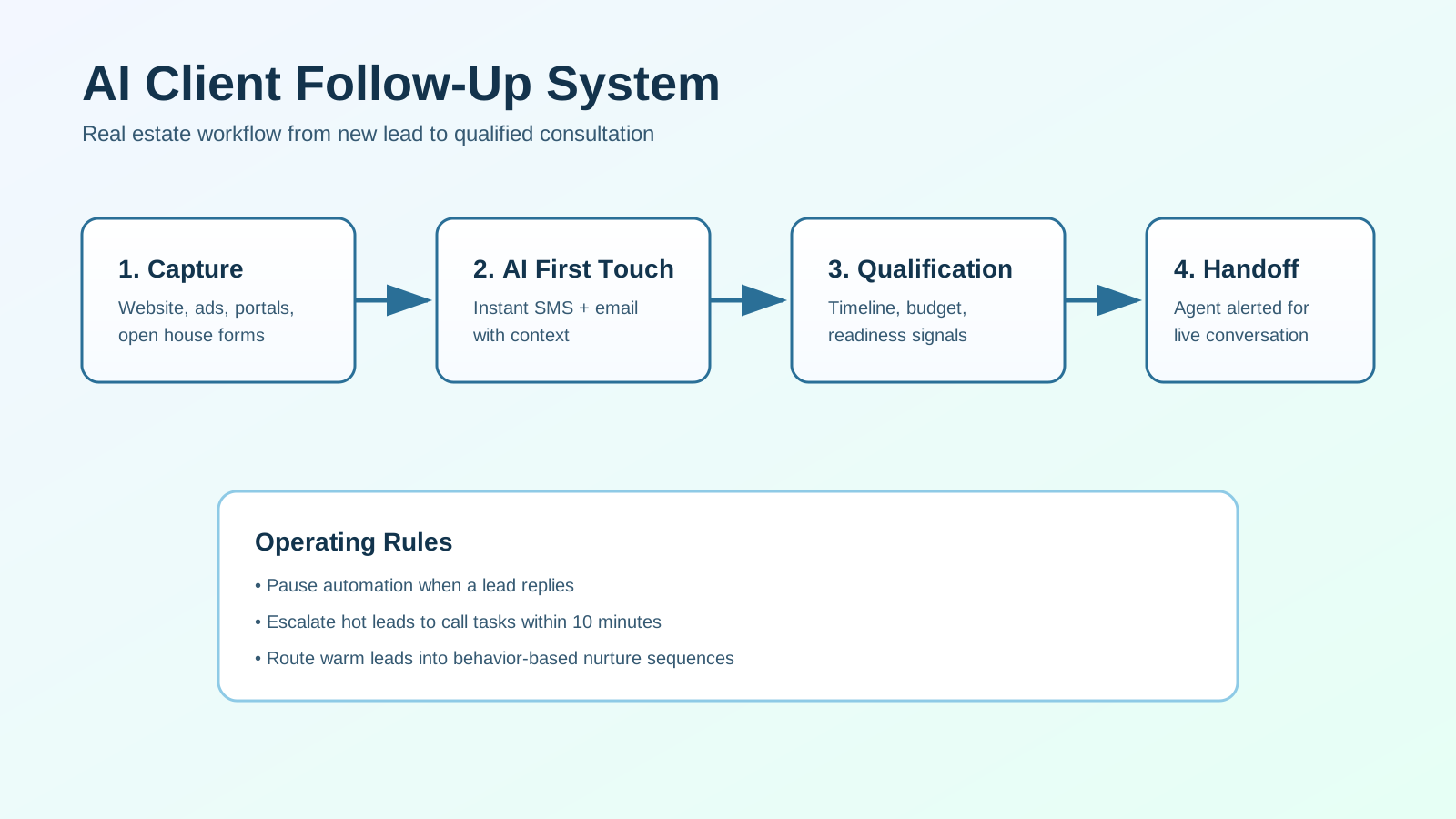
This guide explains how to design and operate an AI-driven workflow that is practical, compliant, and conversion-focused.
For the shorter strategic version, see Real Estate CRM Automation and Real Estate Lead Follow-Up Automation before going deeper into the AI-assisted layer.
What an AI Client Follow-Up System Should Do
At minimum, your system should execute six functions reliably:
- Capture new leads with standardized data.
- Trigger immediate first-touch communication.
- Qualify intent and readiness using short prompts.
- Route leads by urgency, fit, and ownership rules.
- Create agent tasks and handoffs at the right moments.
- Track outcomes so the workflow can be improved over time.
If your setup only sends a generic text and email, that is not a full system. It is a partial automation.
Why Teams Implement AI Follow-Up Automation
The value of ai follow up automation is operational consistency under real workload pressure.
Common bottlenecks it solves:
- delayed response after form submissions
- inconsistent qualification between team members
- dropped leads during handoffs
- weak follow-up for warm and long-cycle opportunities
- poor source-level reporting
When designed correctly, the system improves:
- speed-to-lead
- reply rate
- appointment booking rate
- agent productivity
- pipeline clarity
Core Architecture (Five Layers)
Build the workflow in layers so each part has a clear role.
1. Capture Layer
Collect required fields from every source:
- name
- phone and/or email
- source and campaign
- buyer/seller intent
- target area
- timeline hint
Bad input quality creates weak personalization and bad routing later.
2. AI First-Touch Layer
Within 1-3 minutes, trigger:
- acknowledgment SMS (if consented)
- acknowledgment email
- call task for assigned owner
The first-touch goal is to start a useful conversation, not send long scripts.
3. Qualification Layer
Use a short question framework to capture readiness signals:
- timeline
- financing status or sale readiness
- area and property priorities
- next-step preference
Keep it compact. Long qualification flows reduce response rates.
4. Routing and Handoff Layer
Use rule-based routing by:
- geography
- lead type
- price band
- language
- agent capacity
High-intent events should create immediate agent alerts and next-action tasks.
5. Reporting Layer
Track workflow performance weekly:
- first response time
- reply rate by channel
- qualification rate by source
- consultation set rate
- conversion to active client
Without this layer, you cannot optimize system performance.
Workflow Diagram: From Lead to Live Conversation
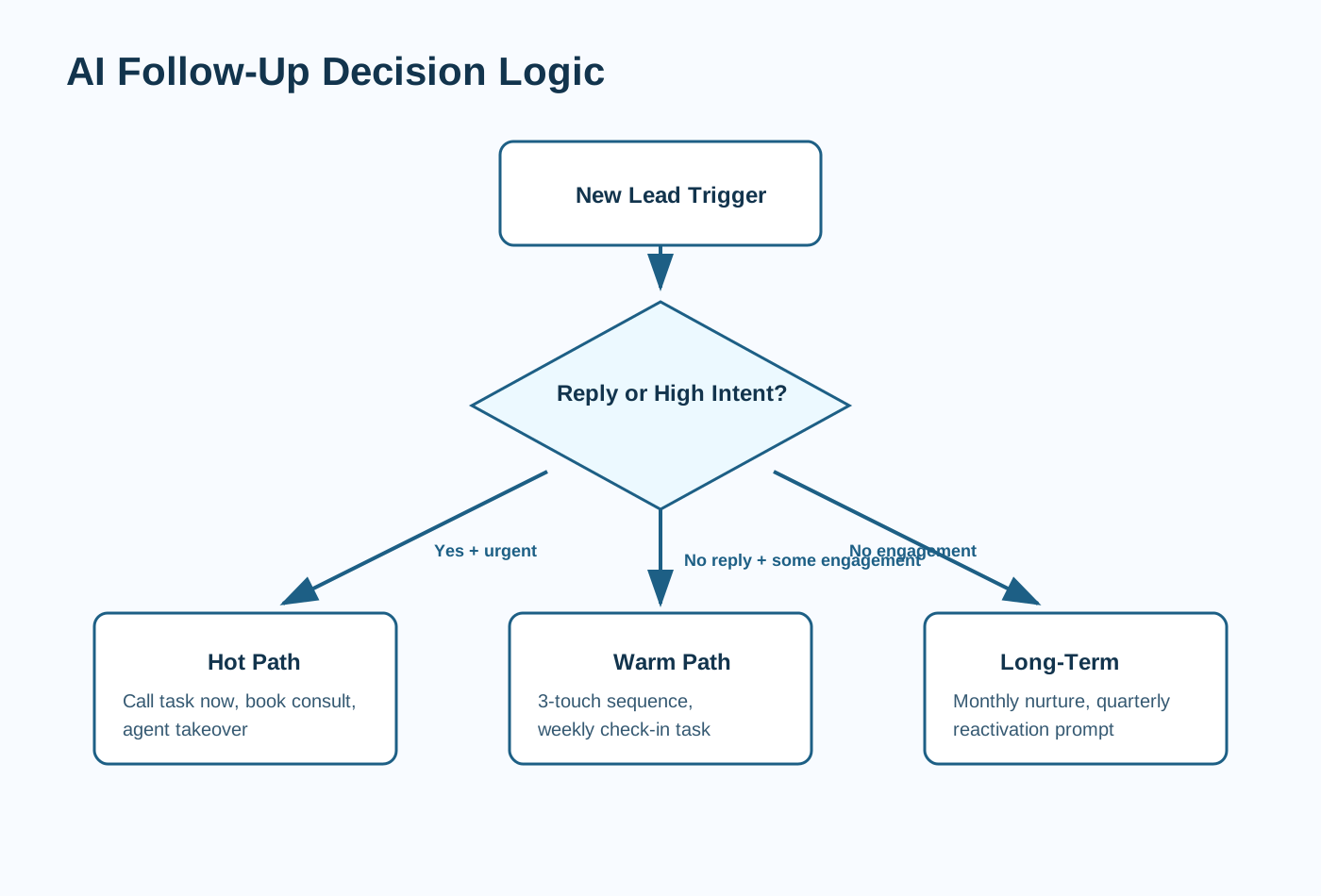
Use this sequence as your baseline operating model.
Step 1: New Lead Trigger
When a lead record is created:
- apply source tags
- assign owner
- set status to
New - stamp intake timestamp
Step 2: Immediate AI Acknowledgment
Send first-touch messages quickly with context:
- mention source or property context
- set response expectation
- ask one short, actionable question
Step 3: Qualification Micro-Sequence
If there is no live reply, run 2-3 touches:
- touch 1: intent clarification
- touch 2: timeline and area confirmation
- touch 3: low-pressure next-step prompt
Stop automation when the lead replies or books.
Step 4: Branch by Readiness
Route by real behavior and qualification signals:
Hot: immediate agent call workflowWarm: short nurture and scheduled follow-upLong-Term: monthly nurture with periodic reactivation
Step 5: Agent Handoff
Handoff should include:
- lead source summary
- key qualification answers
- recommended conversation objective
- due time for next action
This preserves context and reduces duplicate questioning.
Step 6: Closed-Loop Optimization
Review data by source and segment, then adjust:
- message timing
- question sequence
- scoring thresholds
- routing logic
Small weekly changes outperform one-time redesigns.
Practical Message Framework (Human and Specific)
First SMS (Immediate)
“Hi [First Name], this is [Agent Name] from [Brand]. Thanks for reaching out about [Area/Property]. If helpful, I can share a short plan based on your timeline. Are you aiming to move in the next 3 months or later?”
First Email (Immediate)
Subject idea: Quick next step for your move in [Area]
Body structure:
- quick acknowledgment
- one useful next step
- one qualifying question
Follow-Up Prompt (No Reply)
“Quick check-in: would you like me to send 2-3 options that match your criteria in [Area], or is your timeline still early?”
Keep messages concise and permission-based.
Compliance and Quality Controls
AI workflows in real estate should be fast, but controlled.
Configure these guardrails:
- respect opt-in and opt-out states per channel
- pause automated sends when a lead replies
- cap sequence volume to avoid message fatigue
- log every automated action in CRM timeline
- send agent alerts for missed SLA tasks
Use reviewed templates and avoid claims that require legal or brokerage approval.
KPI Framework for Operating Decisions
Track metrics in three categories.
Speed Metrics
- median first response time
- percentage of leads touched in 5 minutes
Quality Metrics
- reply rate by first-touch template
- qualification completion rate
- handoff completeness rate
Outcome Metrics
- consultation booking rate
- conversion from qualified to client
- conversion by source channel
If speed improves but outcomes do not, revise qualification and handoff design.
Common Failure Modes (and Fixes)
Failure 1: Generic AI Copy
Problem: messages read robotic and produce low reply rates.
Fix: include source context, area context, and one clear question.
Failure 2: No Stop Rules
Problem: leads receive automation after they already replied.
Fix: pause all sequences on reply and move to agent-owned tasks.
Failure 3: Weak Routing Logic
Problem: high-intent leads wait in standard nurture.
Fix: add urgency thresholds and escalation rules.
Failure 4: Over-Qualification
Problem: too many early questions reduce engagement.
Fix: use 2-4 questions max before live conversation.
30-Day Implementation Plan
Week 1: System Foundations
- define fields and source tagging
- document routing rules
- finalize approved message templates
Week 2: First-Touch + Qualification
- launch immediate SMS/email trigger
- deploy 3-touch qualification sequence
- test stop conditions and reply detection
Week 3: Handoff + SLA Controls
- configure hot/warm/long-term branches
- create alerting for missed response windows
- audit handoff quality with sample records
Week 4: Reporting + Optimization
- build weekly KPI dashboard
- compare template performance
- adjust scoring weights and sequence timing
This phased rollout keeps implementation controlled while producing early gains.
Frequently Asked Questions
What is an AI client follow-up system in real estate?
It is a structured workflow that combines AI messaging and automation with agent handoffs to improve response consistency and conversion.
Will AI follow-up replace agents?
No. It should automate repetitive timing and routing tasks while agents handle discovery, strategy, and relationship-driven decisions.
How fast should the system respond?
For most teams, first-touch should happen within 1-3 minutes, with urgent leads escalated for immediate calls.
What should I measure first?
Start with speed-to-lead, reply rate, qualification rate, consultation booking rate, and conversion by source.
Final Recommendation
Treat AI follow-up as an operating system, not a message generator.
The highest-performing real estate teams automate speed, structure, and accountability while protecting human ownership of consultative conversations.
If you want this mapped to your current CRM and team workflow, schedule a consulting call and we can design the system architecture with you.